
Here are instructions to use Zoom from a phone or tablet, if you're happy to use that. Zoom is pretty reliable and allows us to have a recording, should we want one.
If you're planning to use Zoom from a laptop, my instructions HERE may be more helpful.
I recommend you set up Zoom and have a little practice right now.
1. Get the Zoom app on your phone
Use the app store on your phone to get Zoom Cloud Meetings. It’s free.
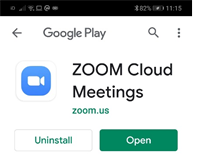
Tap on “Open”.
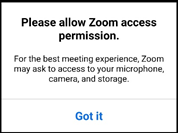
Run it, and give your phone and Zoom any permissions they ask for, such as:
Now Zoom is on your phone! Your phone screen should have this icon:

2. Do a test-run and get Zoom all set up
Tap the blue Zoom icon any time you want to run Zoom.
Tap on “Join a meeting”
It will ask you to type in a meeting ID.
I will have sent you joining details like:
**************
Join Zoom Meeting
https:/us04web.zoom.us/j/123456?pwd=abcdefg
Meeting ID: 123456
Password: abcdefg
**************
Type in the meeting ID and the Password, then “Join Meeting”.
Now click on Join with Video (unless you don’t want to be seen).
Another way of getting into a Zoom meeting
There’s another way in that’s just as easy: if you have my email on your phone, tap on the meeting link I sent you (such as htts://us04web.zoom.us/j/123456?pwd=abcdefg )
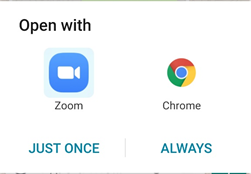
Your phone may ask you if you want to open with Zoom or with your usual browser. Click on Zoom, and ALWAYS:
You’re in the meeting!
3. Check your audio is on
Bottom left of your screen is the audio/microphone setting. (Tap your screen if you can’t see the icons at the bottom) Choose the “Call via Device Audio”. Now you can speak and be heard.
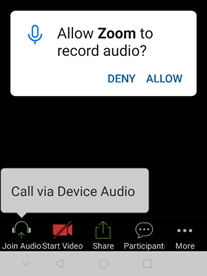
Any time you want to mute yourself, tap your screen, and you’ll see the “Mute” button bottom left. First you may need to click to “ALLOW” the audio.
4. Check your video is on
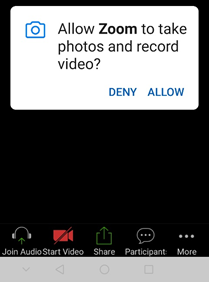
The button to start or stop your video (so you can be seen or not) is at the bottom of the screen. If you can’t see it, tap the screen. If you're asked to “ALLOW” the use of your video camera, do so:
5. Leave the meeting and come back later
Now you’re all set up for the meeting and you won’t have all these things to click next time. You can “LEAVE” now (in red). Shortly before your meeting is due, use the steps in 2. to get in into the meeting. You can leave it on, go make a cuppa, and I'll be there at our appointed time.
Speak soon!